






Foldable Bluetooth Keyboard – Portable Ultra Slim Multi-Device Mini Wireless 66 Keys Pocket Size Rechargeable Tri-Mode Cordless for iOS Android Windows Laptop Tablet iPhone PC
Original price was: $20.20.$19.18Current price is: $19.18.
Price: $20.20 - $19.18
(as of May 10, 2025 21:44:49 UTC – Details)
Product Description


Multi-device Connectivity
This foldable Bluetooth keyboard connects with Bluetooth 3.0+5.0 technology and supports simultaneous connection of 3 devices, so you can switch between them at will.

Ultra Slim & Portable
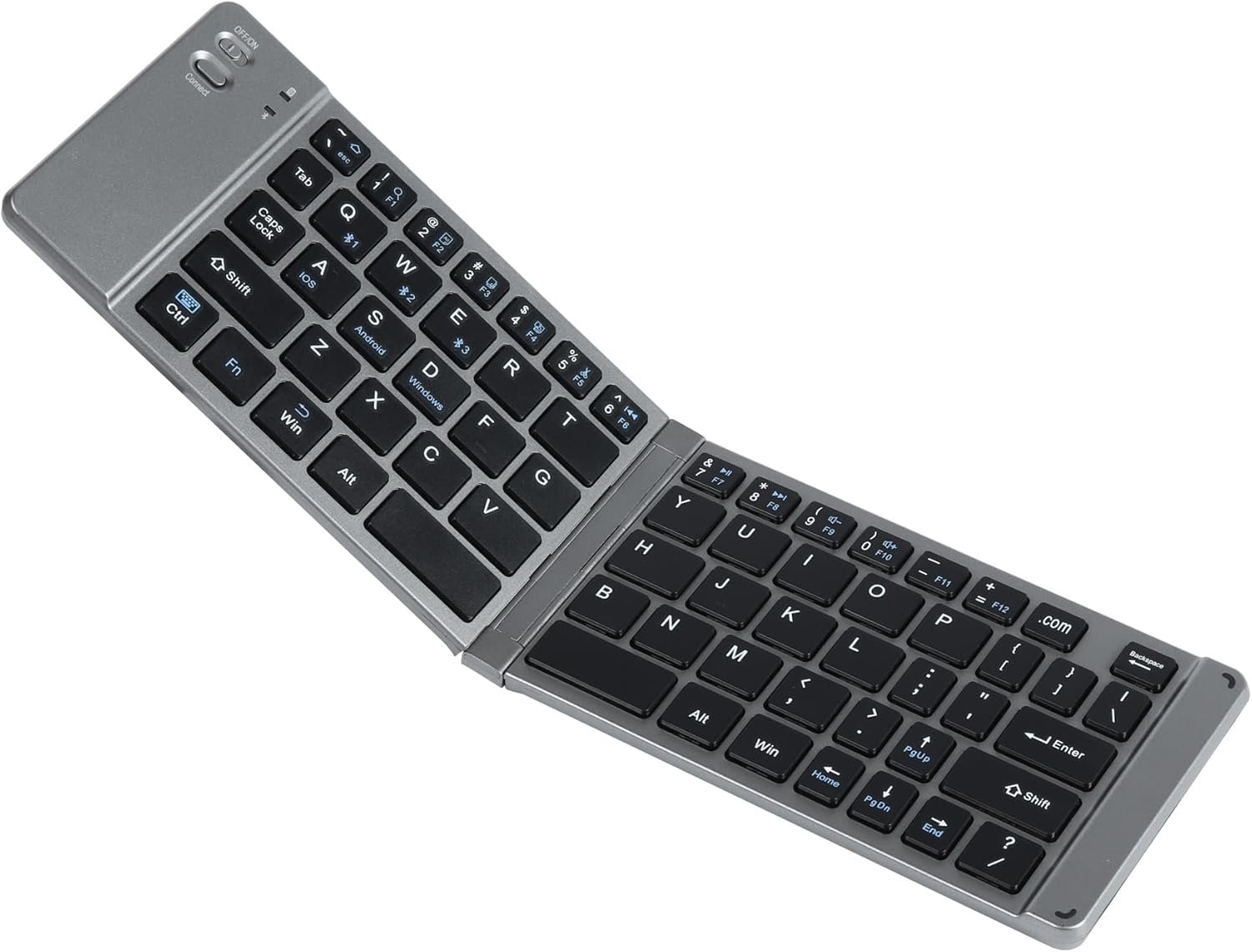
This portable wireless keyboard features a foldable design that allows you to fold the keyboard into a pocket size and carry it around in your pocket or backpack.

Comfortable Typing
This multi-device keyboard features scissor keys and an ergonomic design with low clicking sound for comfortable and efficient typing, making it perfect for libraries, offices, and more.
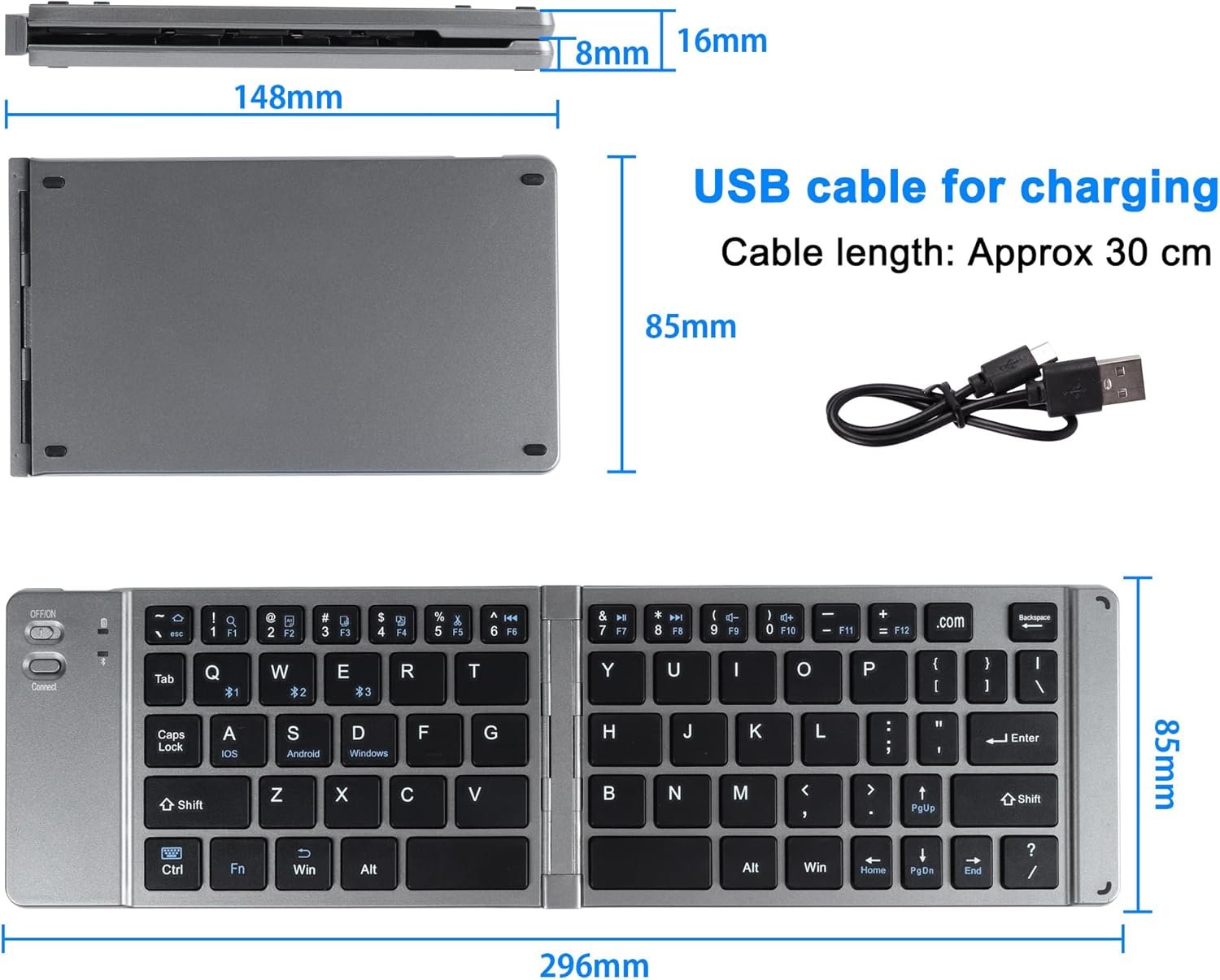
Package Includes 1 x Folding Keyboard 1 x Charging cable 1 x Manual
Specifications:
Product Name: Folding Bluetooth Keyboard
Bluetooth: Bluetooth v3.0+5.0
Color: Grey
Material: Plastic
Size:
Fold: 148*85*16mm/5.83*3.35*0.63inch; Open:296*85*8mm/11.65*3.35*0.31inch(Approx)
Number of keys: 66
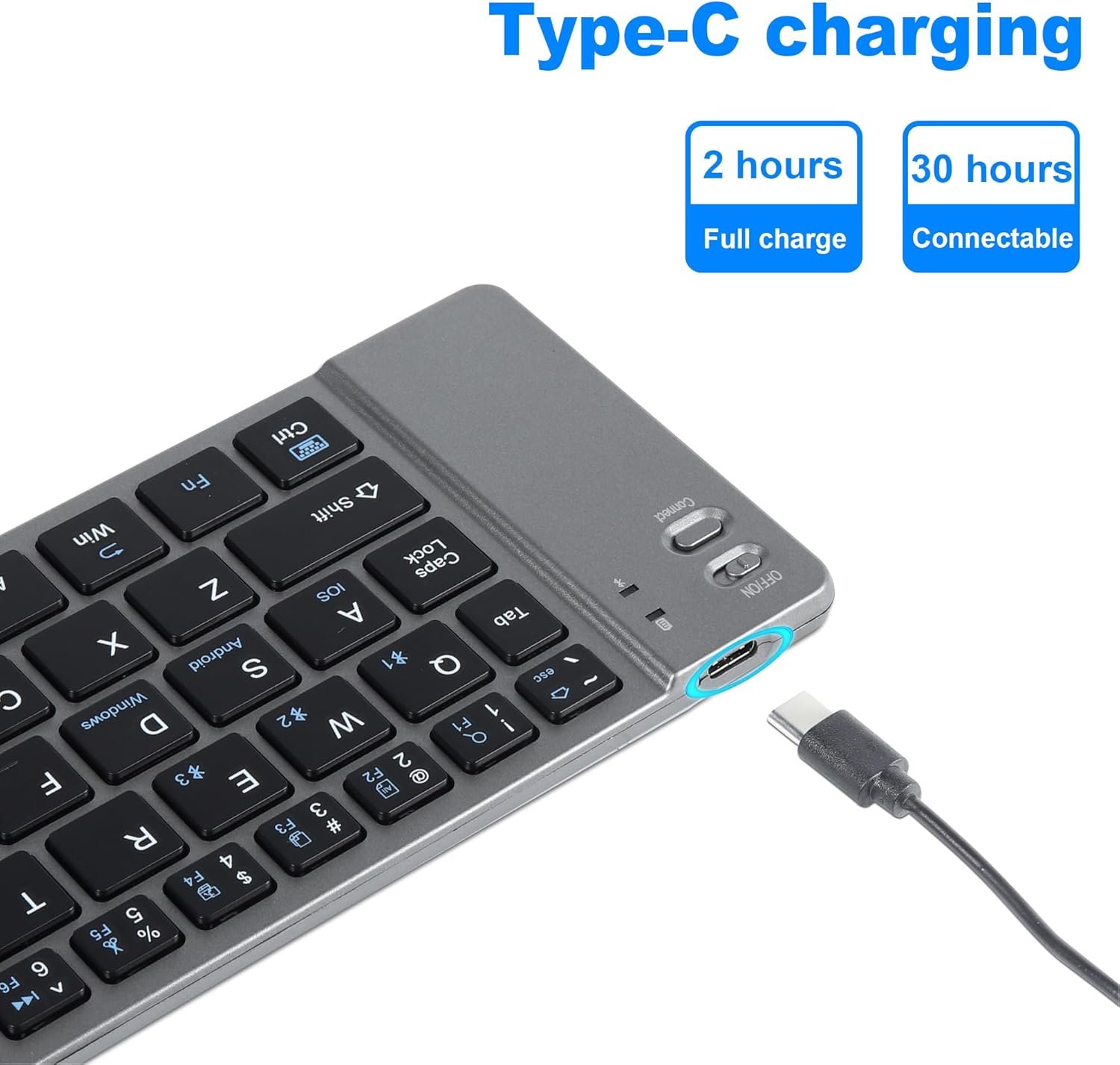
Interface: Type-C
Compatible System: Windows/iOS/Android
Bluetooth connection for multiple devices:
Device 1:
1.After pressing “FN+Q,” lightly press the pairing key “Connect.” The blue light will start blinking, indicating that it has entered Bluetooth pairing mode.
1.Turn on “Bluetooth” and enter the search mode.
2.Find the [Bluetooth 5.0 Keyboard] or [Bluetooth 3.0 Keyboard], select the corresponding Bluetooth name based on the Bluetooth version of your device, and click on the pairing name to connect. 3.Once the device is successfully paired with the keyboard, the blue light will stop blinking.
Device 2:
1.Press “FN+W” briefly, and the blue light will illuminate while disconnecting from Device 1. Lightly press the pairing key “Connect,” and the blue light will start blinking, indicating that it has entered Bluetooth pairing mode.
1.Turn on “Bluetooth” and enter the search mode.
2.Find the [Bluetooth 5.0 Keyboard] or [Bluetooth 3.0 Keyboard], select the corresponding Bluetooth name based on the Bluetooth version of your device, and click on the pairing name to connect. 3.Once the device is successfully paired with the keyboard, the blue light will stop blinking.
Device 3:
1.Press “FN+E” briefly, and the blue light will illuminate while disconnecting from Device 1. Lightly press the pairing key “Connect,” and the blue light will start blinking, indicating that it has entered Bluetooth pairing mode.1.Turn on “Bluetooth” and enter the search mode.
2.Find the [Bluetooth 5.0 Keyboard] or [Bluetooth 3.0 Keyboard], select the corresponding Bluetooth name based on the Bluetooth version of your device, and click on the pairing name to connect.
System Switch
Press FN+A to switch to Android system and use the Android keyboard function. The blue LED will flash three times to indicate a successful switch.
Press FN+S to switch to Windows system and use the Windows keyboard function. The blue LED will flash three times to indicate a successful switch.
Press FN+D to switch to iOS system and use the iOS keyboard function. The blue LED will flash three times to indicate a successful switch.
Shortcut Key of Three system switching languages
iOS: Control+Space key
Windows: Alt+Shift
Android : Shift+Space
FAQ :
1.The tablet PC can’t connect the BT keyboard?
—1) At first check the BT keyboard is into match code state, then —open the table PC Bluetooth searching.
—2)Checking the BT keyboard Battery is enough, the battery low is also lead to can’t connect, you need charge.
2.The keyboard indication light always flashing when use?
—Keyboard indication always flashing when use, is means the keyboard will be no power ,please charge the power as soon as possible.
3.The table PC display BT keyboard is disconnect?
—The Bluetooth keyboard is not used for a period of time, the device will automatically enter the sleep state in order to save power. Press any key on the keyboard to wake up, and the Bluetooth connection wil be automatically restored.
Add to Cart
Customer Reviews
4.4 out of 5 stars 11
4.1 out of 5 stars 34
3.7 out of 5 stars 25
4.0 out of 5 stars 10
3.7 out of 5 stars 25
4.0 out of 5 stars 10
Price
$19.18$19.18
— no data
— no data
$17.69$17.69
— no data
$20.51$20.51
Color
Grey Pink Blue Black Black Rose Gold
Connectivity Technology
Bluetooth Bluetooth Bluetooth Bluetooth Bluetooth Bluetooth,USB
Item Dimensions
11.65 x 3.35 x 0.31 inches 9.72 x 5.9 x 0.19 inches 9.72 x 5.9 x 0.19 inches 4.5 x 2.4 x 0.4 inche 9.64 x 7.08 x 0.27 inches 11.2 x 2.72 x 0.55 inches
Item Weight
6.87 ounces 11.3 ounces 12.3 ounces 2.2 ounces 1.79 pounds 11.39 ounces
Platform
iOS, Android and Windows Android/Windows/iOS 13 and Above. Android/Windows/iOS 13 and Above. Windows/Mac/Linux OS/Android/Windows MoHe (5.0 & later)/Nokia Symbian S60(V3.0 & later) OS/Sony Playstation 3/HTPC with built-in Bluetooth/Apple iPad, iPhone /Touch in (2.0 & later) OS iPad Pro/Air/Mini, iPad 4/3/2, iPhone, Galaxy Tab, Macbook Pro/Air, Surface Pro and more Windows XP Home Edition, Windows XP Professional Edition, Mac OS X, Linux, Chrome OS, iOS, Windows 10, etc.
【Multi-Device Wireless Keyboard】This ultra slim Bluetooth keyboard for tablet supports 3 devices to connect at the same time, you can switch at will without delay. Bluetooth 3.0&5.0 technology provides stable and fast connection with quick response and working range up to 33 feet.
【Pocket Size】This portable keyboard for laptop is foldable design, you can fold the compact keyboard into a pocket size, easy to use, feel free to put it into your pocket or backpack to carry around. Perfect for traveling and on-the-go use.
【Widely Compatibility】This foldable keyboard bluetooth is compatible with iOS, Android and Windows operating systems. The wireless keyboard bluetooth is suitable for iPhone, Android, Windows Tablet, PC and Windows Phone and other devices.
【Ergonomic Keyboard】This compact wireless keyboard features scissor keys and ergonomic design, low clicking sound, comfortable and efficient typing, perfect for libraries, offices and more.
【Rechargeable Battery and Power Saving Function】This multi device keyboard has a built-in rechargeable battery, which can last up to 40 hours of continuous use after two hours of charging, and can be recharged using the charging cable. If the slim keyboard is not used for 10 minutes, the pocket keyboard will enter sleep mode to save power, press any key to wake up the folding keyboard.










Reviews
There are no reviews yet.